Introduction:
A few years ago, seeing a doctor meant driving to a clinic and sitting in a waiting room. Today, you can often start with a phone call, a video visit, or a message sent through an app. That convenience is real, but it also raises practical questions. Which service should you use? What will it cost? What can a virtual visit actually handle? And how do you know the service is legitimate?
This guide explains how online health works in the United States, Canada, and the United Kingdom, and how to use online health services in a way that is safe, affordable, and useful. It is general education, not medical advice for your situation.

What “Online Health Services” Actually Means
People use several terms for the same general idea. The U.S. National Library of Medicine’s MedlinePlus defines telehealth as using communication technologies to provide health care from a distance. That covers more than video calls. It includes:
- Phone or video visits with a clinician
- Secure messages to your provider through a patient portal
- Remote monitoring, such as a device that sends your heart rate to your care team
- Educational videos and appointment reminders sent by your provider
MedlinePlus also notes that “telemedicine” is sometimes used as a synonym but is narrower than telehealth. In everyday searches, you will see all of these terms used loosely, so it helps to focus on what you need rather than on the label.
What Online Health Services Can and Cannot Do Well
Virtual care works best when a clinician can make good decisions from a conversation, your history, and what you can show on camera. According to MedlinePlus, care available through telehealth may include general wellness visits, prescriptions, dermatology, eye exams, nutrition counseling, mental health counseling, and urgent care conditions such as sinusitis, urinary tract infections, and common rashes.
It has limits too. MedlinePlus lists several of them:
- A clinician who is not your regular provider may not have your full medical history.
- You may need to coordinate follow-up with your regular provider yourself.
- Sometimes a diagnosis requires an in-person exam or a lab test.
- Technology can fail, and some insurers do not cover every virtual visit.
The World Health Organization’s 2019 guideline on digital health, summarized in an article in npj Digital Medicine, takes a similar balanced view. It recommends client-to-provider telemedicine in specific contexts, as a way to complement rather than replace in-person services, and where patient safety, privacy, and accountability can be monitored. The authors also note that the certainty of the evidence ranged from very low to moderate. In plain terms, virtual care is a useful tool, but it does not suit every problem.
| Often a good fit for a virtual visit | Often needs in-person care |
|---|---|
| Follow-up on a long-term condition | Symptoms that need a physical exam or testing |
| Mild, common problems a clinician can assess by conversation | Sudden, severe, or rapidly worsening symptoms |
| Medication reviews and refill discussions | Injuries that may need imaging or stitches |
| Mental health counseling | Any emergency |
| Nutrition and lifestyle counseling | Procedures, vaccinations, and many screenings |
This table is a general guide. A clinician will decide what is appropriate for you, and may move you to an in-person visit during the appointment.
When not to use an online service
If you think you are having an emergency, do not wait for a virtual appointment. Call your local emergency number (911 in the US and Canada, 999 in the UK). Examples of emergency warning signs include chest pain, trouble breathing, signs of a stroke, severe bleeding, or thoughts of harming yourself. If you are in the UK and need urgent advice that is not an emergency, the NHS points people to 111 online or the 111 phone line.
Step 1: Start With the Option You Already Have
The most effective way to access online health services is usually not to search for a new website. It is to find out what your existing care team or health plan already offers. Starting there keeps your records in one place and often costs less.
| Country | Good first places to look |
|---|---|
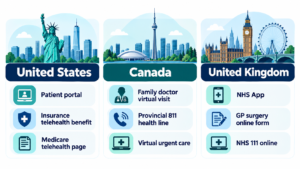
| United States | Your doctor’s patient portal or office; your insurer’s telehealth benefit; Medicare’s telehealth page if you have Medicare |
| Canada | Your family doctor or clinic (many offer phone or video visits); your province’s health line, such as 811 in some provinces; provincial virtual urgent care programs where they exist |
| United Kingdom | The NHS App or your GP surgery’s online form; NHS 111 online for urgent advice; private online GP services if you choose to pay |
Availability and rules differ by state, province, and nation, so confirm details with your provider or plan.
Step 2: Understand How Access Works in Your Country
In the United States
Your insurer, your employer plan, or your provider’s office is usually the entry point. Ask whether telehealth visits are covered and what your share of the cost will be before you book.
If you have Medicare, coverage rules for telehealth have changed several times since 2020 because Congress extended temporary flexibilities in stages. According to legal and policy summaries, the Consolidated Appropriations Act, 2026, signed on February 3, 2026, extended key Medicare telehealth flexibilities through December 31, 2027. These include allowing many services to be received at home. Because this area has changed repeatedly, check the official Medicare telehealth coverage page for the current rules and confirm with your own plan.
If you do not have insurance, ask the provider for the visit price in advance. The U.S. Department of Health and Human Services’ telehealth guidance for patients advises asking about costs before the visit and notes that your provider may know of local resources if you cannot afford care.
In Canada
Health care is organized by province and territory, so details vary. Many family doctors and clinics now offer phone or video appointments, and some provinces run virtual urgent care or nurse advice lines. In Ontario, for example, Health811 offers free nurse advice by phone or online chat, 24 hours a day. It does not diagnose conditions or renew prescriptions. Some virtual urgent care clinics in Toronto also describe their services as free for Ontario residents. In British Columbia, you can call 8-1-1 for free health advice from nurses and other professionals, and a nurse may refer you to a virtual physician by phone or video. Rules on what is covered by provincial insurance, and what private virtual services charge, differ. Check your provincial health ministry or health line before paying for a private service.
In the United Kingdom
Within the NHS, the usual starting point is your GP surgery. The NHS App states that you may be able to ask your GP surgery about a health problem through the app. You answer questions about your symptoms, and the surgery reviews the information and responds with an appointment or other support. You may also be able to submit the form for a child or someone you care for, depending on your surgery. If your surgery does not offer this in the app, contact them directly.
NHS arrangements differ somewhat across England, Scotland, Wales, and Northern Ireland, so use your own nation’s NHS website for local details. Private online GP services also exist. They charge fees and are separate from your NHS GP, so ask how information will be shared with your regular surgery.
Step 3: Check That the Service Is Legitimate
Anyone can build a website that looks medical. Before you share personal information or pay, check the basics.
- Look for a licensed clinician. A real service lets you see who will treat you and what their qualifications are. You can look up US doctors through your state medical board, Canadian doctors through the provincial college of physicians and surgeons, and UK doctors on the General Medical Council register.
- Check regulation where it applies. In England, the Care Quality Commission registers and regulates most online doctor services that are based in England and treat people in England. Services based elsewhere may be regulated by a different body, or may not meet the same standards, so check where a service is based.
- Expect an assessment. A legitimate service asks about your symptoms and medical history. Be cautious of any site that offers prescription medication with no real consultation, or that promises a particular drug before you have spoken to a clinician.
- Read the privacy policy. You should be able to find out how your health information is stored and who can see it. The HHS site has a page on protecting your data and privacy when using telehealth.
- Be wary of pressure. Countdown timers, “limited-time” discounts, and guaranteed outcomes are not signs of good medical care.
- Look for clear pricing. You should know what a visit costs, and whether a prescription or follow-up costs extra, before you commit.
For more on judging websites, see our guide to finding reliable online health information and our walkthrough on how to choose an online health service.
Step 4: Prepare for the Visit
Preparation makes a short appointment far more useful. The HHS telehealth guidance for patients offers practical advice that applies in any country:
- Know the cost first. Ask how much the visit will cost before you begin.
- Ask for help if you need it. Tell the provider if you need a screen reader, captions, or other support.
- Pick a quiet spot with a good connection. Choose somewhere you can speak openly.
- Test your technology. Check your internet connection, camera, microphone, and speakers beforehand.
- Sign in early. If something goes wrong, you can message or call the office.
- Write down what you want to cover. HHS suggests listing your medicines and doses, your concerns and questions, any readings you have (such as temperature, weight, blood pressure, or blood sugar), and any allergies.
- Do not take the visit while driving. HHS also advises against eating or drinking during the visit.
During the video call, your screen will usually show buttons for the camera, microphone, chat, and a red button to end the call. If a camera or microphone icon has a line through it, the clinician cannot see or hear you.

Step 5: Make the Most of the Appointment
A virtual visit can feel rushed if you are not ready. A few habits help:
- Start with your main concern. Say the most important thing first, then add detail.
- Describe, don’t diagnose. Tell the clinician what you notice, when it started, and what makes it better or worse.
- Ask what to expect. If anything is unclear, ask the clinician to explain it again.
- Ask what happens next. Find out whether you need tests, a follow-up, or an in-person visit, and what symptoms should prompt you to seek care sooner.
- Request a summary. HHS suggests asking the provider to send you notes or a summary after the visit.
- Share only what you are comfortable sharing. You decide what to discuss.
Useful questions to ask a clinician include: What do you think is going on? What are my options? How soon should I expect to improve? When should I get in touch again? Should I see someone in person?
Step 6: Follow Up and Keep Your Records Together
After the visit, make sure the right people know what happened. If you used a service that is separate from your regular doctor, send them a copy of your visit notes or ask the service to share them. This addresses a limitation MedlinePlus highlights: when you see someone outside your usual care team, coordinating follow-up may fall to you.
Keep a simple record of the date, the clinician, what was discussed, any medicines prescribed, and any follow-up steps. If you use several services, one running note on your phone is better than scattered emails.
Cost: What to Ask Before You Book
MedlinePlus notes that virtual visits may cost less than in-person visits, but “may” is the important word. Costs depend on your insurance, your province or nation, and the provider. These questions help you avoid surprises:
- Is this visit covered by my insurance, provincial plan, or the NHS?
- If I pay myself, what is the total price, including any prescription or follow-up fees?
- Will the visit be with my own provider or a different clinician?
- If I need to be seen in person afterward, who arranges that?
Whether telehealth or urgent care is cheaper for a given problem depends on your plan and the service, so compare the actual prices rather than assuming.
Common Barriers and How to Handle Them
Limited internet or devices. Many services can be done by phone. HHS notes that for most telehealth visits you need an internet connection and a device such as a smartphone, computer, or tablet, so ask whether a phone visit is available.
Not comfortable with technology. Ask the office whether someone can walk you through the setup in advance. Having a family member help you test the app before the visit can reduce stress.
Privacy at home. If you share a space, consider using headphones, choosing a time when others are out, or asking whether a phone call would be more private.
Language or accessibility needs. Ask the provider in advance about interpreters, captions, or screen reader support.
Doubts about quality. It is reasonable to ask for an in-person visit if you feel a virtual one is not enough.
For tools that can help with this process, see our roundup of the best online health tools.
Frequently Asked Questions
Is there a free online doctor I can talk to?
Sometimes, but “free” depends on where you live and what you need. In the UK, NHS services are generally free to use for people who are eligible, including asking your GP surgery a question through the NHS App where it is available. In parts of Canada, some provincial virtual care programs are free for residents. In the US, truly free options are limited, so ask about costs first and ask whether local resources exist. Be careful with sites that advertise “free” doctors but then push paid products.
Can I use an AI chatbot instead of a doctor?
AI tools can help you understand a medical term or prepare questions. They cannot examine you, order tests, or take responsibility for your care, and they can be wrong. The WHO digital health guidance emphasizes that digital tools should complement, not replace, health services. Use a chatbot as a study aid at most, and do not use it to diagnose yourself or decide whether symptoms are serious.
Is it cheaper to go to urgent care or use telehealth?
It depends on your insurance or plan, the provider, and the problem. MedlinePlus says virtual visits may be cheaper than in-person visits, but that is not guaranteed. Ask for the price in advance and compare it with the in-person option. If your symptoms could be serious, cost should not stop you from getting in-person or emergency care.
Will insurance still pay for telehealth?
Many plans cover at least some telehealth, but coverage varies by plan and service. MedlinePlus notes that some insurers may not cover every telehealth visit. For Medicare in the US, federal flexibilities were extended through December 31, 2027, according to legal and policy summaries, but you should confirm current rules on Medicare’s website. Always check your own plan before you book.
Can an online doctor prescribe medication?
Often yes, if the clinician decides it is appropriate after assessing you. MedlinePlus lists prescriptions among the services that may be available through telehealth. But a clinician may decide a medicine is not suitable, or that you need an exam or test first. Rules for tightly controlled medicines, such as opioids, are stricter, differ by country and region, and can change over time, so ask the service about its policy rather than assuming. A legitimate service will not hand out prescriptions without a proper assessment.
Can I get antibiotics online without seeing a doctor?
Antibiotics only treat certain bacterial infections, and a clinician needs to decide whether you need one. A virtual clinician may prescribe one if it is appropriate, but you should be wary of any service that sells antibiotics without assessing you. If a clinician does not prescribe one, that does not mean your concern was ignored. It may mean antibiotics would not help.
Can I get a prescription online without seeing a doctor?
You should expect some form of assessment by a licensed clinician, even if it happens by video, phone, or a detailed online questionnaire reviewed by a clinician. Avoid websites that skip the consultation entirely, because they may be unsafe or illegal in your location.
How do I access NHS online services?
The NHS App is the main route for many people in England. Through it you may be able to book appointments, ask your GP surgery about a health problem, and manage appointments, depending on your surgery. If your surgery does not offer a service in the app, contact it directly. The NHS App help pages explain the current steps for getting set up.
Is an online GP worth it?
That depends on your goals. A private online GP may offer quicker appointments, but it costs money and may not have access to your full NHS records. If you use one, ask how information will be shared with your regular GP, and check that the service is regulated and that its doctors are on the General Medical Council register.
Is telehealth still available in Ontario or British Columbia?
Virtual care is available in both provinces, though the details change. In Ontario, Health811 gives free nurse advice by phone or chat, and some virtual urgent care programs exist. In British Columbia, the free 8-1-1 line can connect you with a nurse, and a nurse may refer you to a virtual physician by phone or video. Neither line is a substitute for a doctor’s assessment, and Ontario’s Health811 does not renew prescriptions. Check your provincial health ministry website for current coverage details.
What is the best online health website or app?
There is no single best option, because the right choice depends on your country, insurance, and need. Start with services connected to your own doctor, insurer, or national health system. For information rather than care, rely on official sources such as MedlinePlus, the NHS website, or your provincial health authority. Our guide on online healthcare clinic reviews can help you compare options.
What are red flags when choosing an online doctor?
Watch for guaranteed cures, pressure to buy quickly, no named or verifiable clinicians, no clear privacy policy, unclear prices, and offers of prescription drugs without a consultation. Any one of these is a reason to look elsewhere.
The Bottom Line
Effective use of online health services comes down to a few habits. Start with the provider or plan you already have. Check that any new service is licensed, transparent, and clear about price. Prepare a short list of symptoms, medicines, and questions before you log in. Ask what happens next, and keep your regular doctor informed. And remember that virtual care complements in-person care rather than replacing it, so do not hesitate to ask for an in-person visit or call emergency services when your symptoms call for it.
For a broader overview, you can also read our online healthcare guide. For official patient guidance on preparing for a virtual visit, see the U.S. Department of Health and Human Services’ page on what to know before your telehealth visit, and for the global policy view, the World Health Organization’s Consolidated telemedicine implementation guide.
This article provides general health information and is not a substitute for professional medical advice, diagnosis, or treatment. Contact a qualified health professional about your own situation.