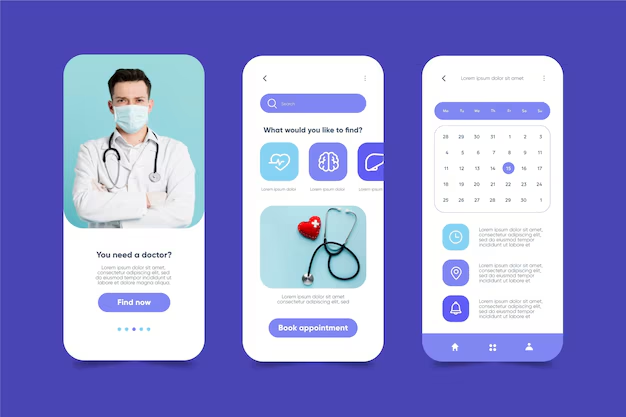
Essential Features to Look for in Telehealth Apps: Enhancing Patient Care and Accessibility

Think about the last time you genuinely dreaded a medical appointment — the traffic, the waiting room, the awkward small talk with a stranger coughing beside you. Now imagine replacing all of that with a ten-minute video call from your living room, your records already pulled up, a prescription sent to your nearest pharmacy before you’ve even put your phone down. That’s not some distant utopian vision. That’s telehealth in 2025, and it’s reshaping how millions of people across the United States, Canada, and the United Kingdom manage their health every single day.
But here’s the thing: not all telehealth apps are created equal. Some are sleek, intuitive platforms that feel like they were designed with the patient at the center. Others are clunky, confusing portals that make you miss the waiting room — almost. The difference between a transformative digital health experience and a frustrating one almost always comes down to one thing: the features built into the platform. Knowing which features in telehealth apps actually matter — and why — is the smartest thing you can do before booking your first virtual appointment.
What Is a Telehealth App, and What Is It Best For?
Before diving into the feature checklist, let’s get one thing straight. A telehealth app is a digital platform that connects patients with licensed healthcare providers remotely — via video, audio, chat, or even asynchronous messaging. Think of it as your personal healthcare concierge, available on your phone, tablet, or desktop. If you’re entirely new to this world, our detailed guide on how telehealth works for patients is the perfect place to build your foundation before evaluating any platform.
Telehealth is best suited for a wide range of healthcare needs: managing chronic conditions, mental health consultations, prescription refills, dermatology consultations, pediatric check-ins, post-surgical follow-ups, and even urgent care for non-emergency situations. According to a peer-reviewed study published in the Journal of Telemedicine and Telecare, telehealth significantly improves access to care, particularly for patients in rural or underserved areas — a reality felt acutely across parts of Canada and the UK’s regional communities.
What telehealth is not best for? Emergencies, complex physical examinations requiring hands-on assessment, or conditions requiring immediate imaging. Know those boundaries, and telehealth becomes one of the most empowering health tools in your arsenal.
The 4 P’s of Telehealth: A Framework Worth Knowing
If you want to understand why the right features in telehealth apps matter so deeply, start with the four foundational pillars of telehealth — often referenced as the 4 P’s: Provider, Patient, Platform, and Policy.
- Provider refers to the healthcare professional’s ability to deliver high-quality care remotely.
- Patient focuses on accessibility, ease of use, and the experience on the receiving end.
- Platform is the technology architecture that makes it all possible — including every feature you’re about to read about.
- Policy covers regulatory frameworks, reimbursement, and data governance that shape what a platform can legally do in your region.
Every meaningful feature in a telehealth app maps back to at least one of these pillars. Keep this mental model as you read.
What Are the Key Components of Telehealth?
Before unpacking specific app features, it helps to understand the broader ecosystem. The key components of telehealth include:
- Synchronous communication (live video or phone calls)
- Asynchronous communication (secure messaging, store-and-forward data)
- Remote Patient Monitoring (RPM) — using devices to track vitals and transmit data
- Mobile Health (mHealth) — apps that support health management on smartphones
- Electronic Health Records (EHR) integration — the digital backbone tying everything together
The best telehealth apps don’t just offer one of these; they weave several together into a seamless patient experience. Now let’s get into the specifics.
The Non-Negotiable Features in Telehealth Apps

1. High-Quality Video and Audio Capabilities
This one sounds obvious, but you’d be surprised how many platforms drop the ball here. A telehealth consultation is only as good as the quality of the connection. Providers need to clearly see skin conditions, observe body language, and notice visual cues that inform diagnosis. Patients need to hear instructions without asking for repetition three times.
Look for platforms that offer HD video, adaptive bandwidth optimization (so the call holds up on a 4G connection), and background noise suppression for audio clarity. According to Empeek’s detailed breakdown of telemedicine features, real-time video is the cornerstone around which every other feature is built — without it functioning flawlessly, the entire experience collapses.
2. Robust Scheduling and Appointment Management
Gone are the days of playing phone tag with a receptionist. A great telehealth app lets you book, reschedule, and cancel appointments directly within the platform — with automated reminders delivered via SMS, email, or push notifications. For providers, intelligent scheduling tools prevent double-bookings and help manage patient flow across time zones, which matters enormously in countries as geographically sprawling as Canada.
Look for: calendar integrations (Google Calendar, iCal), waitlist management, and multi-provider scheduling.
3. Secure Messaging and Asynchronous Communication
Not every health concern requires a live consultation. Sometimes you need to send your doctor a photo of a rash, ask a quick follow-up question, or share lab results. Secure in-app messaging — encrypted and HIPAA-compliant in the US, PIPEDA-aligned in Canada, and NHS Digital standard-compliant in the UK — bridges this gap beautifully.
This feature also supports what healthcare professionals call store-and-forward telemedicine, where data like images, ECG readings, or pathology reports are submitted for later review. It’s asynchronous care at its most efficient.
4. Electronic Health Records (EHR) Integration
Here’s where things get really sophisticated. An app that integrates seamlessly with existing EHR systems means your provider isn’t starting from scratch at every appointment. Your medication history, allergies, previous diagnoses, and test results are all accessible in real time.
According to Elation Health’s analysis of top telehealth software features, EHR integration is one of the most critical differentiators between basic telehealth platforms and genuinely clinical-grade solutions. Without it, providers are flying blind — and patients pay the price.
For anyone managing a chronic condition or navigating care across multiple specialists, this feature isn’t a bonus. It’s essential.
5. Remote Patient Monitoring (RPM) Tools

This is where telehealth transitions from reactive to genuinely proactive care. RPM tools allow patients to use connected devices — blood pressure cuffs, glucometers, pulse oximeters, smart scales — to transmit real-time health data to their care team.
For patients managing diabetes, hypertension, or heart conditions, this capability is transformative. Providers can catch deteriorating trends before they become emergencies, and patients feel genuinely supported between appointments — not just during them.
A recent study published in PMC (National Institutes of Health) highlights how remote monitoring significantly reduces hospital readmission rates and improves patient outcomes for chronic disease management — a compelling data point for any health-conscious professional evaluating platforms.
6. E-Prescribing Capabilities
The ability to send a prescription directly to a patient’s preferred pharmacy — without paper, fax, or a follow-up phone call — is one of telehealth’s most satisfying features in practice. Look for platforms that support controlled and non-controlled substance prescribing within your region’s legal framework, with built-in drug interaction alerts and pharmacy network integrations.
In the US, e-prescribing is now standard across most states. In the UK, NHS Electronic Prescription Service (EPS) compatibility is the benchmark to look for.
7. HIPAA/PIPEDA/NHS-Compliant Security and Privacy Controls
This one deserves its own spotlight — not buried in fine print. Any platform handling your health information must demonstrate end-to-end encryption, multi-factor authentication, role-based access controls, and full compliance with regional data protection regulations.
In the US: HIPAA compliance is non-negotiable. In Canada: PIPEDA (or provincial equivalents like PHIPA in Ontario) governs health data. In the UK: NHS Digital’s Data Security and Protection Toolkit sets the standard.
Always verify independently. A telehealth provider that’s cagey about its compliance credentials is a provider you should walk away from.
8. Multi-Device Compatibility and an Intuitive Interface
What makes many health and wellness apps user-friendly is the consistency of experience across devices. A platform that works flawlessly on a desktop browser but becomes impossible to navigate on a mobile phone has already failed a significant portion of its users.
Look for: native iOS and Android apps, browser-based access (no mandatory downloads), accessibility features for users with visual or hearing impairments, and clean, uncluttered UI design. The best platforms apply what UX researchers call “progressive disclosure” — they show you exactly what you need, exactly when you need it, without overwhelming you.
9. Integrated Payment Processing and Insurance Verification
Nothing punctures the elegant simplicity of a virtual care experience like a confusing billing process. The best telehealth apps handle payment processing, co-pay collection, and insurance verification right within the platform. In the US context, this means real-time eligibility checks against major insurance networks. In the UK, NHS-integrated platforms should distinguish clearly between NHS-funded and private services.
10. Lab Ordering and Results Management
A telehealth app truly earns its place in your healthcare ecosystem when it can close the loop on diagnostic workflows. Look for platforms that allow providers to order labs directly, have results delivered to the patient portal, and trigger automatic notifications — complete with provider commentary — when results arrive.
This feature dramatically reduces the frustrating “we’ll call you with results” limbo that patients have endured for decades.
Key Features of Good Health Apps: A Comparative Overview
| Feature | Basic Platforms | Mid-Tier Platforms | Premium Platforms |
|---|---|---|---|
| HD Video Consultations | ✅ | ✅ | ✅ |
| Secure Messaging | ❌ | ✅ | ✅ |
| EHR Integration | ❌ | Partial | ✅ Full |
| Remote Patient Monitoring | ❌ | ❌ | ✅ |
| E-Prescribing | ❌ | ✅ | ✅ |
| Insurance Verification | ❌ | Partial | ✅ |
| Lab Ordering & Results | ❌ | ❌ | ✅ |
| Multi-Device Compatibility | ✅ | ✅ | ✅ |
| HIPAA/PIPEDA Compliance | ✅ | ✅ | ✅ |
| Mental Health Modules | ❌ | ✅ | ✅ |
Future Trends in Telehealth: What’s Coming Next
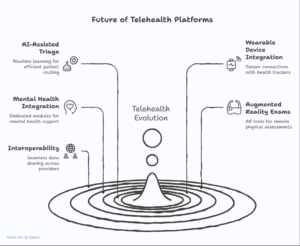
Understanding where telehealth is heading is just as important as knowing what it offers today. Here are the developments shaping the next generation of platforms:
AI-Assisted Triage and Symptom Checking — Machine learning algorithms that pre-assess patient symptoms before a consultation, routing them to the most appropriate care provider.
Wearable Device Ecosystems — Deeper integrations with Apple Health, Google Health, and third-party wearables, creating richer longitudinal patient data.
Mental Health Integration — Dedicated modules for telepsychiatry, cognitive behavioral therapy (CBT) exercises, and crisis intervention, increasingly embedded within general telehealth platforms. If mental health support is your primary reason for exploring telehealth, it’s also worth reading up on the best mental health strategies that complement what any virtual platform can offer.
Augmented Reality (AR) Physical Exams — Still nascent, but emerging research suggests AR tools may soon allow providers to conduct more meaningful remote physical assessments.
Interoperability Between Providers — Cross-platform data sharing that allows a GP in Canada to seamlessly access records generated by a specialist in the US — the future of truly borderless care.
For a deeper look at how digital health tools are evolving and what that means for you as a patient, explore our masterclass on how to use telehealth apps effectively.
What Are the Different Types of Telehealth Services?
Telehealth is broader than most people realize. The key service categories include:
- Telemedicine — clinical consultations delivered remotely
- Telepsychiatry and Teletherapy — mental and behavioral health services
- Telenursing — patient education, care coordination, and monitoring by nurses
- Telepharmacy — remote medication management and patient counseling
- Telerehabilitation — physical, occupational, and speech therapy delivered virtually
- Teledermatology — image-based skin assessments
Each of these has specific equipment and feature requirements. A teledermatology platform, for instance, needs superior image resolution and color accuracy. A telepharmacy solution needs robust e-prescribing and medication management tools. Knowing which type of service you’re looking for helps narrow down which features matter most.
For a comprehensive overview of choosing the right digital health solution for your specific needs, check out our guide on how to choose the right online health service for you.
What Equipment Is Needed for Telehealth?
One of the questions patients most frequently ask is what they actually need on their end to use telehealth effectively. The good news: the barrier is low.
Essential equipment:
- A smartphone, tablet, or computer with a camera and microphone
- A stable internet connection (minimum 10 Mbps for HD video)
- A quiet, well-lit private space
Optional but valuable:
- Bluetooth-enabled medical devices (blood pressure cuff, glucometer, pulse oximeter) for RPM
- A digital scale
- A headset for clearer audio
Most platforms work with standard consumer devices — no specialized hardware required for basic consultations.
Frequently Asked Questions About Features in Telehealth Apps
What is the most used telehealth platform? In the US, platforms like Teladoc Health, MDLive, and Amwell dominate market share. In the UK, platforms integrated with NHS services — including Livi and Push Doctor — lead adoption. Canada’s landscape includes Maple and Dialogue. Each has distinct feature profiles; always evaluate based on your specific care needs rather than brand recognition alone.
What are the key features of health Connect? Google Health Connect is an Android-native health data aggregation platform that centralizes data from wearables, fitness apps, and health platforms. Key features include unified health data storage, granular privacy controls, and developer APIs that telehealth platforms can tap to enrich patient records.
What is one key benefit of telehealth? The most consistently documented benefit is improved access to care. Whether you’re a professional in a city who can’t afford a three-hour gap in your workday, a rural patient 90 minutes from the nearest specialist, or a parent who can’t easily leave home, telehealth meets you where you are. Research published in the Journal of Telemedicine and Telecare consistently shows that this accessibility translates directly into better health outcomes through earlier intervention.
What are the key ethical concerns in telehealth? The big three are data privacy, equity of access (digital divide), and the risk of depersonalized care. Not everyone has reliable broadband. Not every platform operates with the same security standards. And virtual care, however convenient, can sometimes miss the human dimension that makes healthcare genuinely therapeutic. These are not reasons to avoid telehealth — they’re reasons to choose platforms that take them seriously.
Which feature is commonly found in health and fitness apps? The most universally present feature is activity tracking — step counts, calorie logging, and heart rate monitoring. Telehealth platforms, however, go further with clinical-grade features like symptom checkers, medication reminders, and provider communication tools that pure fitness apps don’t offer.
For more guidance on navigating digital health tools as a patient or caregiver, explore our full resources at CareDigitally.
The Bottom Line: How to Choose the Right Telehealth App
Choosing a telehealth platform is a lot like choosing a neighborhood to live in. The headline features — location, price — matter, but it’s the details that determine whether you’ll actually be happy there. Does the commute work? Are the neighbors decent? Is the broadband reliable?
Apply the same scrutiny here. Audit your specific care needs. If you’re managing a chronic condition, RPM and EHR integration are must-haves. If you’re a young professional seeking mental health support, look for dedicated therapy modules and asynchronous messaging. If your priority is urgent care access, prioritize platforms with the widest provider networks and shortest wait times.
The ideal telehealth app is one that makes high-quality healthcare feel almost effortless — where the technology dissolves into the background and what remains is simply good medicine, delivered wherever you happen to be.
The platforms that achieve this don’t do it by accident. They do it by getting every feature in this list right. Now you know what to look for.
Have you used a telehealth app recently? We’d love to hear which features made the biggest difference for you. Drop a comment below, share this article with someone who could use it, or explore more digital health guides — starting with our masterclass on how to use telehealth apps and our step-by-step guide on choosing the right online health service.